

This article breaks down how to create a clear and effective cancellation policy for online orders.
In online retail, every order counts – but so do cancellations. A clear cancellation policy for product orders can save you headaches and even boost customer loyalty. By setting transparent rules and boundaries up front, you ease buyer anxiety and avoid nasty surprises later. In fact, shoppers want peace of mind: studies show 63% of people won’t buy if they can’t easily find a store’s policy info.
When your cancellation terms are easy to find and understand, customers feel respected and confident. Conversely, a murky or hidden policy can drive them away or prompt bad reviews – one report found that canceled orders often lead to negative feedback and customer churn. In short, a smart cancellation policy protects your profits and your reputation.
Why a Clear Policy Matters
A good cancellation policy sets expectations for you and your customers. On your side, it helps predict inventory and avoid losses. On the customer side, it lets them feel in control. Imagine a shopper who orders a gift by mistake – they won’t blame you if they know exactly how and when they can cancel or change it. Transparency builds trust. When policies are hidden or confusing, shoppers get frustrated. Retail experts note that making your policies obvious “builds trust with your customers and leaves less room for frustration”. In contrast, a refund or cancellation process that feels like a trap will hurt your brand.
Remember: small retailers like you thrive on repeat business. Clear, friendly cancellation terms reassure buyers that you’re a fair store, increasing the chances they’ll shop again.
Why Customers Cancel (and How to Address It)
Customers cancel orders for many reasons, often related to their feelings or changing needs. Recognizing these behavioral reasons is the first step to reducing cancellations:
- Second thoughts or buyer’s remorse. Nearly half of cancellations come simply because the customer “changed my mind” after ordering. They might have worried about spending too much, or felt unsure about the product. Mitigation: Use your product page to reassure them. Highlight best uses, real photos, and customer reviews so they feel confident. You can even send a friendly order confirmation email reminding them of all the great reasons they bought in the first place.
- Price or better deals elsewhere. With so many choices online, a customer might spot a sale on another site after checking out. Mitigation: Price-matching guarantees or quick discounts can help. For example, if they found a lower price, offer a small discount or store credit instead of a refund. This keeps the sale on your site and shows you value their business.
- Long shipping times or high costs. If the estimated delivery date slips beyond their needs, about 35% of customers will cancel. Another 40% cancel because shipping fees are too high. Mitigation: Be upfront about shipping. Show realistic delivery dates early (e.g. on the product page or during checkout) and break down shipping costs clearly before they hit “Buy.” Consider offering free or faster shipping on higher-value orders. Even sending a quick update like “Your order ships in 2 days” can reassure customers who are anxious.
- Hidden fees or surprises at checkout. Fees or mandatory add-ons (like a service charge) can shock customers late in the process (22% cite this). Mitigation: Always show any fees or taxes in the cart so there are no surprises. Use plain language (“Free shipping over $50!”) instead of legal jargon. When customers trust that the final price is final, they’re less likely to cancel at the last minute.
- Order mistakes. Sometimes people accidentally choose the wrong size, color, or even a wrong product altogether. Then they cancel just to correct it. Mitigation: Let customers confirm their choice before finalizing. For instance, an order review page with a clear summary helps catch errors. Also, enable easy edits or cancellations within a short window (see “Flexible Options” below). Providing this flexibility turns frustration into a positive experience.
- Checkout friction (account requirements, etc.). Making customers jump through hoops (like forcing account creation) drives about 8% of cancels. Mitigation: Allow guest checkout or a quick sign-up. Simplify forms and only ask for what you truly need. The easier it is to complete the purchase, the fewer will bail out and cancel.
By understanding these motivations, you can craft policy details and store practices that preempt the urge to cancel. For example, if buyer’s remorse is common, you might offer a brief no-questions-asked cancel window. If long waits cause anxiety, highlight your fastest shipping option. Each tweak addresses the why behind the cancel.
Tactical Steps to Reduce Cancellations
You can take concrete actions to make cancellations rare and painless. Here are some proven tactics:
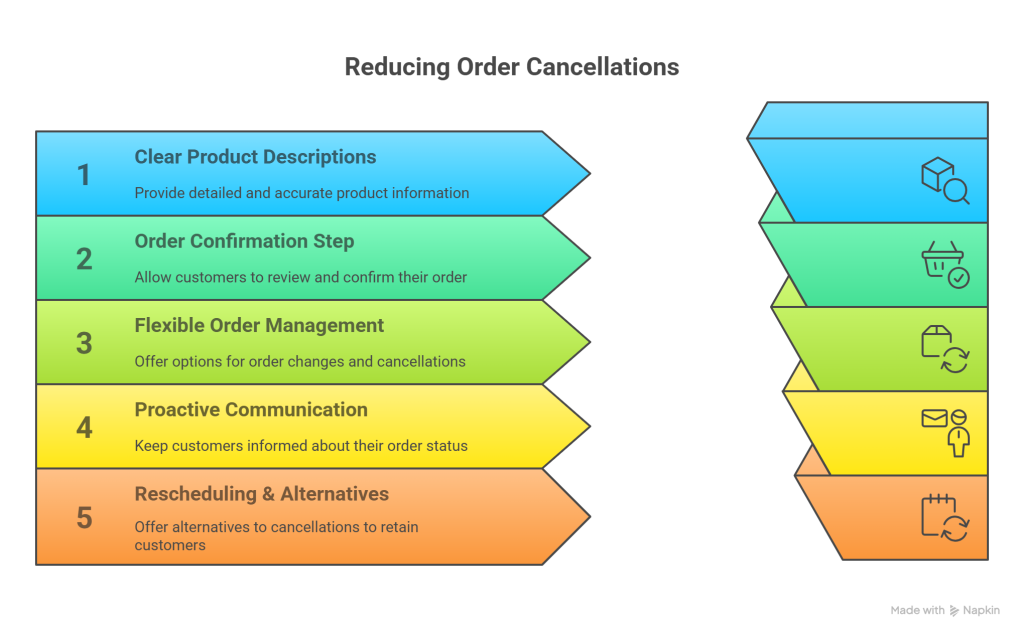
- Write clear product descriptions. Ambiguity leads to doubts. Include all key details: size guides, materials, colors, specs, and high-quality photos or videos. One report found 98% of shoppers have abandoned a cart due to incomplete or confusing content. Keep descriptions concise and scannable (use bullet points!). When customers know exactly what to expect, they are far less likely to cancel after ordering the wrong thing.
- Add an order confirmation step. Before the final click, give customers a chance to double-check their order. Show them a confirmation page with all items, totals, and delivery info, and a simple “Edit” or “Cancel Order” option. This catches mistakes early. You can also require email confirmation (“Confirm your order via a link”) if it suits your workflow. Such confirmation steps make people pause and think: “Yes, I really want this,” reducing impulsive cancels later.
- Offer flexible order management. Give customers room to make small changes. For instance, allow them to cancel or modify an order item within a certain time (e.g. within 12–24 hours or before it ships). Even partial cancellations (removing one item from a multi-item order) can save the rest of the sale. Consider a short “grace period” after purchase where cancellations are free. This flexibility builds goodwill. (Just state the boundary clearly – e.g. “Cancel for free within 1 hour of ordering,” or “no fee if canceled 2 days before shipping.”)
- Be proactive with communication. Keep customers informed at every step. After they order, send an immediate order confirmation email that thanks them and outlines next steps. When the order is processing or ready to ship, send updates. These messages are great places to remind them politely about the cancellation window. For example, a friendly note like “Your order will ship on Tuesday — remember, you can cancel for free up to 24 hours before that” can prevent last-minute surprises.
Similarly, if a delay occurs (maybe an item is out of stock or a shipment is late), notify the customer before they ask. Apologize and offer solutions. Nordstrom’s cancellation email (pictured below) does this well: it starts with a sincere apology and even suggests alternative products to try. Using cancellation-related emails as a positive touchpoint (asking for feedback, offering a discount, or recommending similar items) can turn a potential negative into a chance to win the customer’s loyalty. - Encourage easy rescheduling or alternatives. If a customer cancels, try to salvage the sale. Do you sell similar items or have store credit options? For instance, if the cancel is due to timing or stock issues, offer to hold a product for pickup or give a promo code for a future purchase. Such gestures show you’re on their side and can even convert a cancellation into a loyal return purchase.
- Set a reasonable cancellation window. As part of your policy, define when cancellations are allowed. For physical goods, a common approach is to allow cancellations up until the item ships (or a set time before that). You might say “full refund if canceled within 24 hours of order” or “order can be modified/canceled for 1 day after purchase.” Whatever you choose, make it fair (a shorter time keeps inventory predictable) and stick to it. Then customers know exactly where they stand. (If you do require a fee for late cancellations, mention it upfront in simple terms to avoid bad surprises.)
Setting Fair Boundaries and Building Trust
A cancellation policy should be customer-friendly and business-wise. Aim for a balance: you want to be accommodating, but you also need to manage your costs. To build trust, always explain why certain limits exist. For example, you might explain that after shipping, refunds are hard because of postage costs or restocking – but before shipping, you’re happy to offer a full refund. When customers understand the reason behind the rule, they find it more reasonable.
Language matters. Use a friendly tone (“We understand things change – just let us know within 24 hours”) rather than stiff legalese. State your policy on its own dedicated page or section, but summarize the key points in plain words on the checkout page or order confirmation. Customers should never feel ambushed. In fact, industry experts highlight that trust-based policies actually encourage sales. Big retailers like Nordstrom and Costco found that generous, straightforward return and cancellation policies boost customer loyalty and repeat purchases. In short, showing customers you’re fair won’t hurt your bottom line – it can grow it.
Communicating the Cancellation Policy
To work effectively, your cancellation policy must be visible and clear at every step:
- On your website: Link to the policy in obvious places – the footer, FAQ, and especially on product pages or the cart/checkout page. For example, you might add a small note at checkout like, “Cancel within 24 hours for a full refund” with a link to details. A clear headline like “Order Cancellations” makes it easy to scan. Remember, if customers can’t find it, they’ll assume the worst and maybe abandon the purchase entirely. As one source notes, if shoppers can’t find policy info, over 60% will simply leave.
- In emails: Every transactional email is an opportunity. Your order confirmation email should restate the most important points: e.g. “We’ll hold your order for 24 hours if you change your mind.” The shipping confirmation can remind them of the final cancel deadline. If someone actually clicks “cancel,” send an immediate confirmation email. Whether the cancel succeeds or not, confirm what happened. Omnisend recommends that even negative situations (like out-of-stock or cancel requests) should be met with a polite message and alternative options. A good cancellation confirmation email can actually strengthen your relationship, not ruin it.
- After purchase (invoices/receipts): If you include printed receipts or packing slips, it’s smart to mention the cancellation window there too. Even a small line like “Questions or changes? Contact us within 24 hours to cancel or modify your order” keeps the info top-of-mind. This way, once the order has left their inbox, they still have a clear reference.
By communicating the policy repeatedly but politely, you ensure customers aren’t surprised later. Make it a natural part of the buying journey, not a hidden fine-print trap.
Examples: Good vs. Bad Cancellation Experiences
Consider two scenarios:
- Good experience (no image above): Sarah orders a novelty gift online. A few hours later, she realizes she picked the wrong color. On the store’s website, she easily finds a “Manage Order” link in her account. She clicks it, makes a quick request to change the color, and gets an immediate on-screen confirmation: “Your change request has been received! We’ll process it shortly.” Later, she receives a friendly email: “Hi Sarah – Your color change was successful. Thanks for ordering from us! Let us know if you need anything else.” The whole process felt smooth and personal. Sarah felt respected, not stuck with a mistake. She even got a $5 coupon for her next purchase as a thank-you for her understanding. Example: A clear, empathetic cancellation email (from Nordstrom) that apologizes and suggests alternatives. This kind of message – with an apology and options – leaves customers feeling valued instead of upset.
- Bad experience: Marco realizes he needed to cancel 10 minutes after ordering, but on this site, cancellation is hidden. He emails customer service at 9 PM. The next day, the order ships anyway. Marco calls the store and gets a cagey explanation: “Oh, we saw your email only after it shipped.” He’s upset: he wasn’t given the chance, and he’s out the time and effort. Worse, when he looks for the store’s policy, it’s buried in tiny print. Feeling mistreated, Marco posts a negative review about the poor service. In fact, studies show that unclear cancellation processes often frustrate customers and damage a brand’s reputation. In Marco’s case, no clear “cancellation requested” message left him wondering if his request was ever received – a classic ecommerce pitfall noted by usability researchers.
In summary: good cancellation experiences are fast, friendly, and clear. Customers get confirmation and alternatives. Bad experiences feel opaque and leave customers angry (and possibly publicly venting about it).
Closing Tips: Customer-Friendly Yet Wise
To wrap up, here are some quick tips for a cancellation policy that keeps customers happy and protects your business:
- Use friendly, simple language. Avoid legalese. For example, say “no problem if you cancel within 24 hours” rather than “cancellations permitted up to 24 hours prior to shipment.”
- Be consistent. Apply your rules equally to everyone. Customers trust you more when they know you won’t change the policy on a whim.
- Leverage data. Track how often cancellations happen and why. If you see many cancels due to one product, there may be a description issue or a shipping delay for that item. Use this feedback to refine your process.
- Offer alternatives. Instead of a straight refund, you might offer store credit or an exchange. Sometimes giving a little extra – like covering return shipping – can turn a cancellation into a loyal customer recovery.
- Streamline the process. The easier it is for a customer to cancel correctly, the less likely they’ll do it in frustration. Make your “Cancel Order” button straightforward to use or provide a clear email address/phone where they can reach you about changes.
- Train your team. If you have customer support, teach them to handle cancellations with empathy. A happy customer service interaction can salvage a sale or at least ensure the customer feels heard.
A well-crafted cancellation policy for product orders is not about locking customers out – it’s about inviting them to buy with confidence. By being transparent, fair, and communicative, you reduce unwanted cancellations and turn necessary ones into opportunities. In the end, shoppers will remember how smoothly you handled things. They’ll be more likely to come back – and tell their friends – knowing your store treats them right, even when plans change.